CUSTOMERS & SALES
Start with the customer's story.
Bring customer records, sites, work requests, quotations and invoices into the service workflow. We will demonstrate the available customer and job links in your proposed pilot build.
HVAC & COMMERCIAL MAINTENANCE SOFTWARE
EngiDL Workspace Pro is a service workspace for HVAC and commercial-maintenance teams of 2–30 people. Bring customers, schedules, equipment history and service reports together—and help technicians find reviewed solutions and share what they learn.
Pilot-stage software. A guided demonstration comes first.
Capture the work. Review the experience. Help the next technician.
Sample data shown.

NEW FROM ENGIDL · PHONE APP FOR TECHS
Size line sets with oil return, check superheat and subcooling, and log leaks with the 30-day repair clock. Coming to the App Store and Google Play in January 2027.
ONE COMPANY WORKSPACE
Keep the office and field team working from connected records. Explore four parts of the interface with sample data. Select an image to enlarge it.
CUSTOMERS & SALES
Bring customer records, sites, work requests, quotations and invoices into the service workflow. We will demonstrate the available customer and job links in your proposed pilot build.
INVENTORY & PURCHASING
Follow stock, job materials, purchase orders, deliveries and returns, with supporting documents close to the work.
FINANCE & APPROVALS
Use Director-controlled access and approval workflows for supported financial actions. Live online payments remain disabled.
FROM FIELD WORK TO SHARED KNOWLEDGE
When experience stays in one person's memory, the next technician starts again. EngiDL Workspace Pro gives your company a deliberate way to capture useful lessons, review them and make them easier to find.
Private reports are not automatically published. Authorized reviewers select the report text, photos and audience before sharing.
Ask a questionRecord symptoms, observations, measurements and relevant photos with the service work.
An authorized reviewer checks the content and decides what should be shared—or kept private.
Search reviewed experience as a reference, and check that it applies to the equipment and conditions at hand.
WATCH WORKSPACE PRO
Explore six short, narrated introductions to the workflows. Press play to watch. English captions are included in each video.
Bring service work, equipment and shared knowledge together.
See the technician, phone and equipment record workflow.
Capture experience, review it and help the next technician.
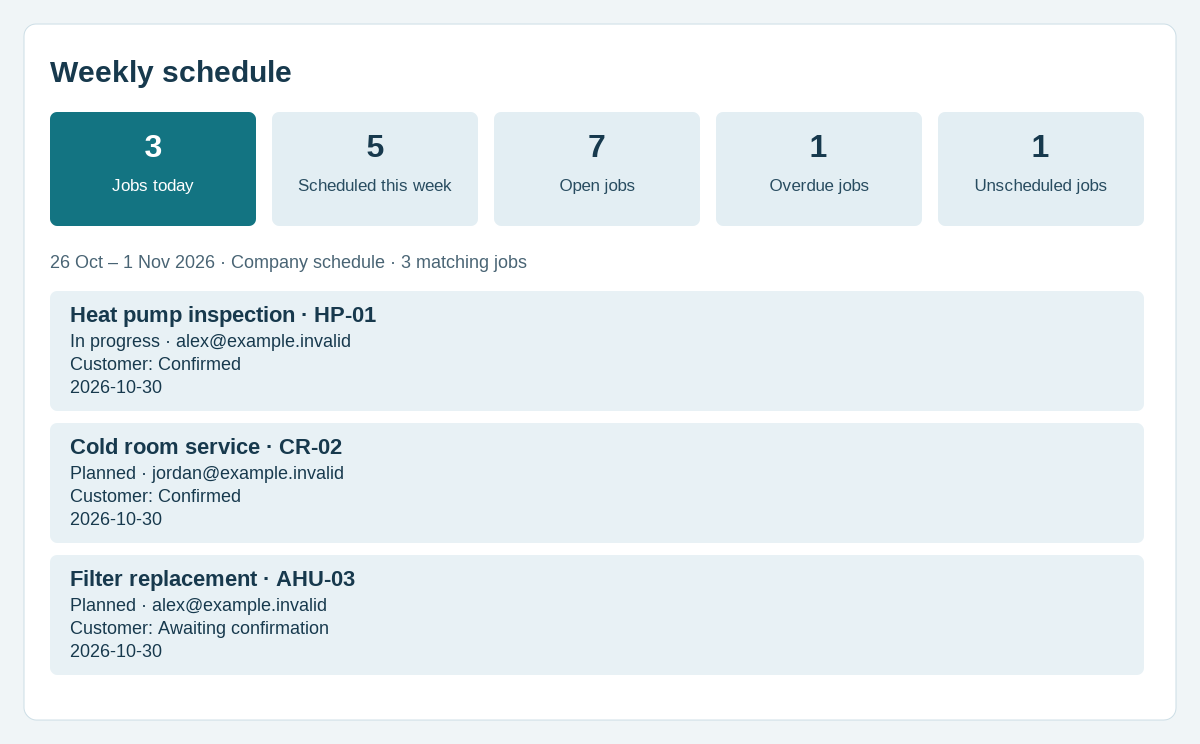
Connect planning, assigned visits and service notes.
Review stock locations, availability and reservations.
Exchange practical advice with company colleagues.
AI-generated talking presenters, illustrative scenes and narration explain the workflows; these are promotional videos, not live software recordings. Features depend on company setup and permissions.
Request a demoOFFICE AND FIELD, CONNECTED
Identify the customer and equipment, review available history, and schedule the visit.
Give the technician permitted job context and check required materials.
Document the work and evidence. Follow applicable review and approval steps.
Continue to quotation or invoicing as appropriate, and review useful lessons for the company library.
See assignments, service records and follow-up work with permissions suited to each person's duties.
Open assigned work, record the visit and find reviewed knowledge from a supported phone browser.
Set responsibilities, review supported approvals and keep control of company access.
A SMALL, CONTROLLED START
We are speaking with HVAC and commercial-maintenance teams in the US, UK and EU. The proposed pilot is for companies of roughly 2–30 people, starting with a small group inside each business.
Request a demoTell us about your current tools and biggest frustrations. Explore a guided demonstration using sample records.
Start with one office contact and one to three technicians, with a short weekly feedback conversation.
Confirm scope, onboarding, support, data handling, any fees, exit/export arrangements and the start date in writing.
Current stage: internal validation and pilot preparation. Real customer data will be introduced only after the agreed readiness checks.
ABOUT ENGIDL
EngiDL LLC is based in Edmond, Oklahoma. We are developing EngiDL Workspace Pro for HVAC and commercial-maintenance businesses that want connected service records and a practical way to retain what their teams learn.
Our immediate focus is a small, supported pilot. We are looking for candid feedback from office staff and technicians. We will establish a good fit before discussing changes to your existing tools.
Ask a questionOur initial focus is HVAC service and commercial-maintenance teams of approximately 2–30 people. We will confirm the fit for your work, locations and team before agreeing a pilot.
Yes. EngiDL Workspace Pro is a browser-based web app that can be added to a supported phone's Home Screen. It is not currently an App Store or Google Play download. iPhone installation has been checked; Android device acceptance remains pending.
EngiDL Workspace Pro works partially offline on desktop computers and supported phones through the optional offline field kit. First sign in while connected, prepare selected jobs on that trusted device and open the offline editor once online. You can then work on prepared job drafts and photos, and review and sync them after reconnecting. The full workspace, including chat, approvals, payments and records not prepared for offline use, requires internet. Browser privacy or device restrictions can prevent local storage. Desktop offline acceptance testing remains pending.
Supported Director controls provide hidden, read-only or read/write tab access, together with role and approval rules. Access is also enforced by the server. We will demonstrate the relevant permissions before your team starts.
Sign in, open Equipment passports and choose “Scan QR / enter code”. On a supported browser, allow camera access and scan a label matching a linked equipment record. You can also enter an equipment ID or serial number manually. You see only records your company account and permissions allow. Scanning does not automatically save a record, change stock or authorize work, and it does not identify every manufacturer’s QR label.
No. Reports go through a separate review process. Authorized reviewers choose the content, photos and audience for publication. Sharing practical knowledge must not expose private customer information.
Yes. Messages brings together a company conversation for team-wide updates and colleague conversations for selected people or groups. Check the company and participant list before sharing messages or permitted attachments. Chat stays inside the workspace; it does not send external email or replace formal approval steps.
Authorized office users can search customer records and open linked job history, with available scheduling, technician assignment and service details. Jobs also has search and filters to help locate earlier work. Results depend on access permissions and the links recorded against each job.
Linked service plans connect the customer, site and equipment, helping the office review due work and prepare jobs. Configurable email reminders can invite customers to confirm an appointment or request a different time. Sending must be configured and activated for the company; customer emails are currently switched off in production. A response does not automatically move or book a visit.
A basic service pricebook lets authorized users copy service prices into draft invoices for review. Maintenance agreements record terms and billing-review dates so the office can check customer entitlements and follow-up work. Billing and entitlement usage remain manual; automatic recurring charges are not enabled.
Your company retains ownership of the records it supplies. We will agree available export formats, retrieval, retention and deletion arrangements in the pilot terms before you provide business data. Please do not send customer records through this website.
Online payment functionality is already set up, with payment-link workflows tested in a test environment. It is an optional feature that can be activated at your company’s request, subject to payment-provider setup, verification and agreed payment terms. Live payments are not enabled by default; activation must be completed before customers can make real online payments.
No pilot price or start date is promised on this page. We will discuss suitability and agree any fees, duration, onboarding and support in writing. The proposed four-week format is a starting point for that conversation.
LET'S TALK ABOUT YOUR TEAM
Tell us who you are and how your team works. We will review your inquiry and arrange a focused demonstration if there is a fit.
hello@engidl.com ↗Already using EngiDL Workspace Pro? Contact support@engidl.com for product support.
Please send business inquiries only. Do not include customer records, passwords, payment details or sensitive service information.